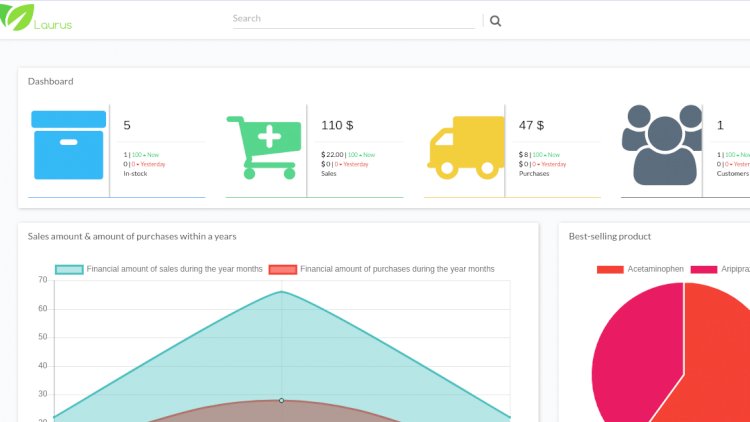
Searching for a pharmacy management system with free source code you can download and study? This PHP/MySQL project covers the parts that make pharmacy software different from a generic store system — expiry dates, stock that must never run out, and daily sales reports.
A pharmacy management system helps a chemist or medicine store track stock, record sales, manage suppliers and watch expiry dates — all from one dashboard. Because medicines expire and must never run out, it’s a great project for learning inventory control with real constraints.
Core features
- Medicine database with categories and suppliers
- Point-of-sale for over-the-counter sales
- Stock and inventory management
- Purchase and income history
- Invoicing and expense tracking
- Dynamic dashboard with sales graphs
- Daily sales and expense reports
What makes pharmacy stock special
Unlike a generic shop, a pharmacy must track batch and expiry: the same medicine can exist in several batches, and the system should sell the soonest-to-expire stock first and warn before items lapse. Implementing that rule is the most valuable part of the build.
Technology stack
Commonly PHP with the CodeIgniter framework and a MySQL database. CodeIgniter’s MVC structure keeps the POS, inventory and reporting modules cleanly separated.
What you’ll learn
Inventory accounting, batch/expiry handling, building a POS that decrements stock atomically, and dashboards that summarise sales and expenses over time.
Frequently asked questions
How do I handle medicine expiry?
Track stock per batch with an expiry date, sell earliest-expiry first (FEFO), and flag items nearing their date.
Can it run on shared hosting?
Yes — a PHP/MySQL app like this deploys to ordinary cPanel hosting without special requirements.
A note on using this project
This guide is written to help students and developers understand how a PHP/CodeIgniter application like this is designed and built. Treat any sample code as a learning reference: read it, run it locally, and adapt it to your own requirements rather than shipping it unchanged. If you reuse third-party components, check their licences first.
Pharmacy Management System Template Free Download
Many searches ask for a pharmacy management system template free download — this project works exactly that way. The source code on this page is a complete, working template: download it free, keep the stock, sales and expiry modules, and re-skin or extend it for your own chemist shop, coursework or client project.
An Open-Source Pharmacy Management System Project
The code is fully open and editable, so it doubles as a pharmacy management system project for students — the modules map cleanly to a typical project write-up (inventory, point of sale, reporting). Pair it with our open-source POS systems roundup or the inventory management software comparison if you need a bigger system to study.
Related projects and guides
Working on this project? These related write-ups on the site are worth a look:
- Gym Management System Using PHP with Free Download
- 6 Best Open-Source Hospital Management Systems (2026)
- Capstone Project Ideas with Source Code (2026) — more PHP, Laravel and MySQL project ideas.