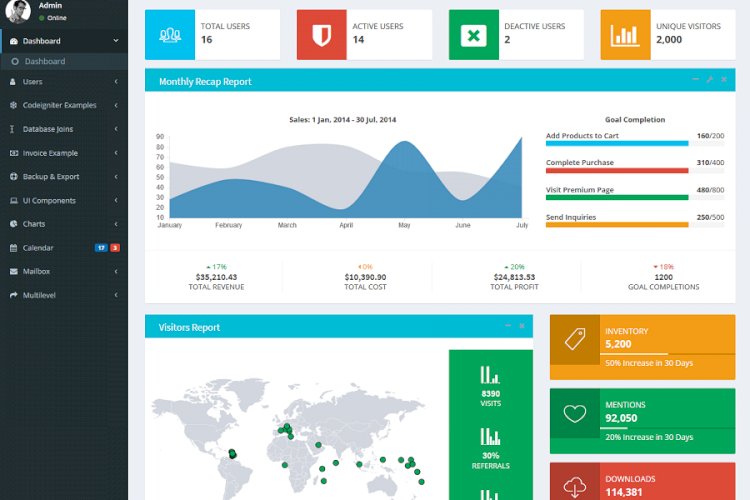
Almost every web application starts with the same plumbing: a login screen, user accounts, roles and permissions, and a dashboard to manage it all. A reusable admin panel packages that boilerplate so you can jump straight to building features instead of rewriting authentication for the hundredth time.
What a starter admin panel provides
- Login, registration and email verification
- Forgot / reset / change password flows
- Google reCAPTCHA and basic brute-force protection
- User roles and granular permissions
- A dynamic, permission-aware side menu
- Profile management and CRUD scaffolding
- Server-side DataTables with pagination and AJAX
Why build on CodeIgniter
CodeIgniter is a lightweight PHP framework with a gentle learning curve, small footprint and clear documentation — which is exactly why it’s popular for admin panels. You get MVC structure, query-builder security and routing without the heavier conventions of larger frameworks.
How roles and permissions work
The core idea is simple: every user has one or more roles, every role grants a set of permissions, and each protected action checks for the right permission before running. Storing this in three tables — users, roles and a role_permissions map — keeps access control flexible and auditable.
What you’ll learn
Authentication done properly (hashed passwords, verification tokens, session management), role-based access control, and how to scaffold CRUD with server-side DataTables — patterns you’ll reuse in every project afterwards.
Frequently asked questions
Can I convert an existing panel to this structure?
Yes — migrate your tables to the users/roles/permissions model first, then move each screen behind a permission check.
Is CodeIgniter still a good choice in 2026?
For small-to-medium admin tools, yes: it is fast, well-documented and easy to host. For very large apps, consider Laravel.
A note on using this project
This guide is written to help students and developers understand how a CodeIgniter/PHP application like this is designed and built. Treat any sample code as a learning reference: read it, run it locally, and adapt it to your own requirements rather than shipping it unchanged. If you reuse third-party components, check their licences first.
Related projects and guides
Working on this project? These related write-ups on the site are worth a look:
- Task Management System using PHP/MySQLi with Source Code
- Automated Reminder system
- Capstone Project Ideas with Source Code (2026) — more PHP, Laravel and MySQL project ideas.