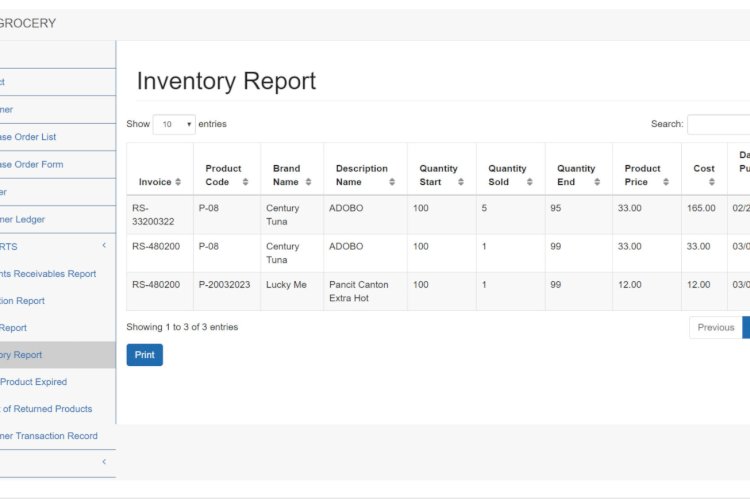
A sales and inventory system for a grocery store combines a cashier-facing POS with back-office stock control, so sales and inventory stay in sync automatically. It’s a practical project that mirrors how real retail software is organised into front-end and back-end roles.
Front end (cashier)
- Point of sale for ringing up purchases
- Collecting cash and credit payments
Back end (admin)
- Master files: products, customers, suppliers
- Purchase orders and customer ledgers
- Reports: sales, collections, receivables, expired products, returns
- Charts by category, cash vs credit, and losses
Why role separation is the lesson
The admin adds and edits products and customers; the cashier can only take payments. Enforcing that split — same database, very different permissions — is exactly the kind of access control production systems need, and it’s the most transferable thing the project teaches.
Technology stack
Often PHP (or Laravel) with MySQL; barcode entry on the POS and Bootstrap for the cashier screen. Stock decrements as items sell, keeping inventory live.
What you’ll learn
Live stock accounting, separating cashier and admin capabilities, identifying low/expired stock, and building management reports and simple charts from sales data.
Frequently asked questions
How does stock stay accurate?
Each sale reduces the relevant product quantity in the same transaction, so on-hand figures update in real time.
Can it handle multiple branches?
Yes — scope products and sales by branch and aggregate reports across them.
A note on using this project
This guide is written to help students and developers understand how a PHP/MySQL application like this is designed and built. Treat any sample code as a learning reference: read it, run it locally, and adapt it to your own requirements rather than shipping it unchanged. If you reuse third-party components, check their licences first.
Tech stack
A project like this is usually built with PHP and MySQL, often with a framework such as Laravel for structure, and Bootstrap for a responsive admin and cashier interface.
What you need to build or run it
- PHP 7.x or newer with a local server — XAMPP, WAMP, or Laragon.
- MySQL or MariaDB for the database.
- An understanding of user roles and permissions, since the cashier and admin share one database but do very different things.
Frequently asked questions
What’s the difference between the cashier and admin sides?
The cashier rings up sales and takes payment; the admin manages products, customers, suppliers, purchase orders, and reports. Same database, very different permissions — that role separation is the core lesson of the project.
What reports does a system like this produce?
Typically sales, collections, receivables, returns, and expired-product reports, plus charts by category and cash-versus-credit — the kind of back-office reporting a real store relies on.
Is there a downloadable version with source code?
Yes — see the related projects below for complete, downloadable POS and inventory systems you can install and study.
Is it suitable for a capstone project?
Yes. It combines POS, inventory, role-based access, and reporting, which makes it a well-rounded final-year project.
Related POS & inventory projects (with source code)
- POS & Inventory System for Grocery Store
- Point of Sale (POS) using PHP/MySQL
- Inventory Management System
- Free Simple Web-Based POS System with Inventory
Related projects and guides
Working on this project? These related write-ups on the site are worth a look:
- Inventory Management System
- POSNIC is Point of Sale-POS-HP and jQuery based web application
- Capstone Project Ideas with Source Code (2026) — more PHP, Laravel and MySQL project ideas.