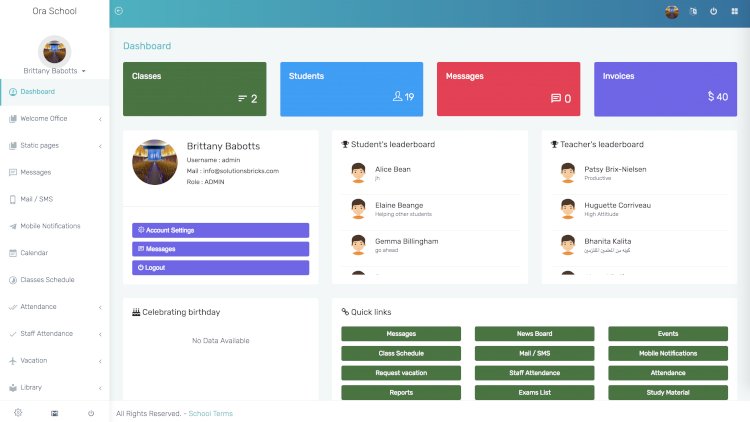
A school management system brings a school’s day-to-day operations — admissions, attendance, timetables, exams, fees and communication — into a single web application. Instead of juggling spreadsheets and paper registers, administrators, teachers, students and parents each log in to a role-specific dashboard and see exactly what they need.
Who each role is for
- Administrators configure classes, subjects, staff and fees, and control permissions.
- Teachers mark attendance, enter grades and publish assignments.
- Students view timetables, results and learning materials.
- Parents follow attendance, results and fee invoices.
- Accountants handle invoicing, payments and financial reports.
Core modules
- Student and staff records with photo ID-card generation
- Class, section and subject management
- Attendance with present/absent/late notifications
- Exams, mark sheets and bulk result generation
- Fee structures, automated invoices and payment-gateway support
- Payroll summaries for staff
- Role-based dashboards and granular permissions
- Inventory and hostel/transport assignment
Typical technology stack
Projects like this are commonly built on PHP (often the Laravel framework) with a MySQL database, a Bootstrap front end and a JavaScript layer for interactive dashboards. That combination keeps hosting cheap and the codebase approachable for students.
What you can learn by building it
A school system is an excellent capstone project because it touches authentication, role-based access control, relational data modelling (students ↔ classes ↔ grades), file handling for ID cards, scheduled notifications and financial reporting — the same patterns you’ll meet in most real-world business software.
How a system like this is set up
- Install a local PHP server such as XAMPP and create a database.
- Import the schema and seed a single administrator account.
- Configure school details, classes and fee structure.
- Add staff and students, then test each role end to end.
Frequently asked questions
Is it suitable for a college as well as a school?
Yes — the same role model (admin, staff, learner, guardian, finance) maps cleanly onto colleges; you mainly rename entities and adjust the grading scheme.
What is the hardest part to build?
Usually the exam/grading and fee-invoicing modules, because they involve the most business rules and edge cases.
What modules does a school management system include?
Most builds ship an admin, staff, student and guardian role, plus core modules for class scheduling, attendance, exams and grading, fee and invoice records, and a notice board with email or SMS alerts.
Can I use it as a free final-year or capstone project?
Yes. It is a common capstone because it covers CRUD, login and role permissions, and reporting in one app. The source code is free to download and adapt, so you can trim it to your own school rules. See more capstone project ideas with source code.
A note on using this project
This guide is written to help students and developers understand how a PHP/Laravel application like this is designed and built. Treat any sample code as a learning reference: read it, run it locally, and adapt it to your own requirements rather than shipping it unchanged. If you reuse third-party components, check their licences first.
Related free source code projects
Building more student-friendly PHP projects? These walkthroughs use the same role-based, database-driven patterns:
- Church Management System — membership, events and contributions in PHP & MySQL.
- Employee Daily Task Management System — task tracking on a lightweight SQLite backend.
- Point of Sale (POS) System — sales, inventory and receipts in PHP & MySQL.
- 6 Best Open-Source School Management Systems (2026)
- 6 Best Open-Source Library Management Systems (2026)